Deploy to Azure automatically
Student manual
Lab scenario
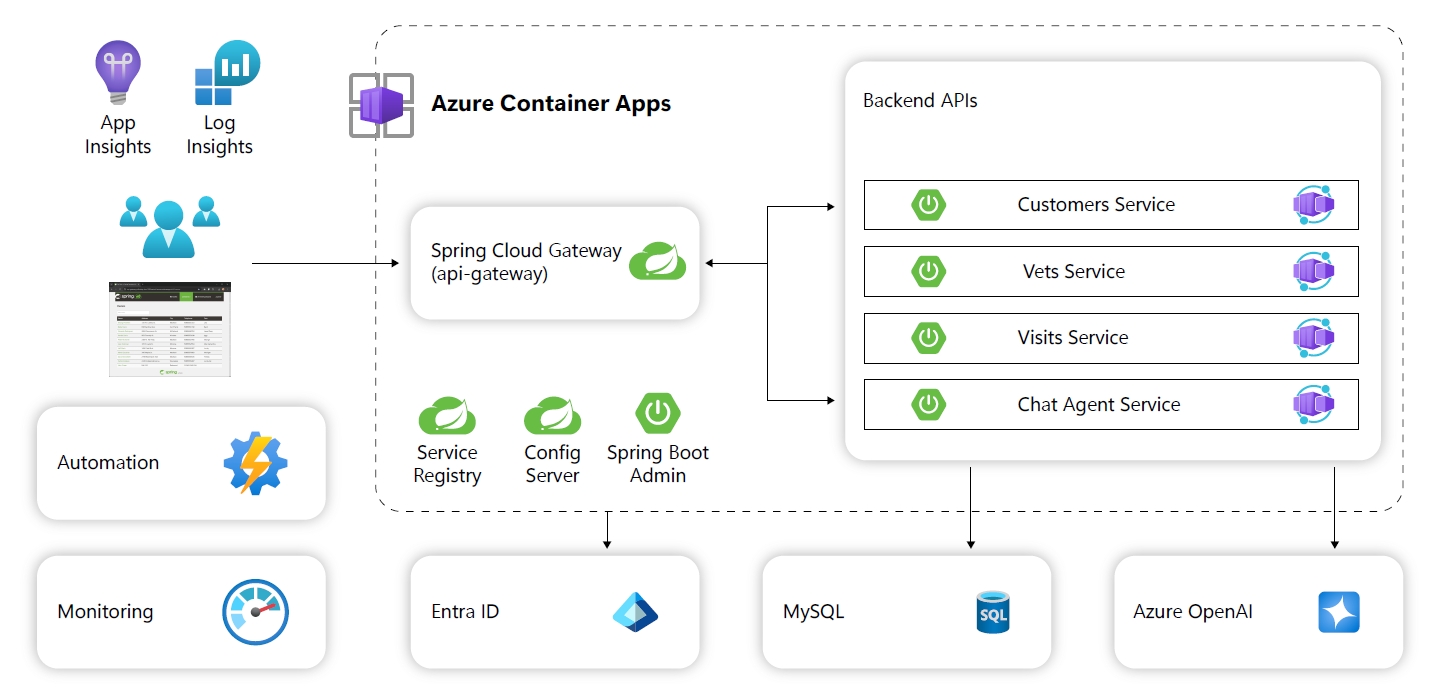
In the Lab 2, Lab 3, Lab 4 and Lab 5 we deploy the petclinic microservice solution to Azure Container Apps step by step. These steps are full of details but time costing.
In this lab, we introduce a new tool azd to help deploy the solution to Azure with single command.
Objectives
After you complete this lab, you will be able to:
- Get familiar with the azd tool.
- Deploy the petclinic solution (with AI) to your Azure Container Apps environment.
- Test your setup.
Lab Duration
- Estimated Time: 30 minutes
Instructions
During this lab, you will:
- Deploy the sample microservices to Azure Container Apps automatically.
- Learn how to triage some problems with the one-click solution.
Others
-
This version of azd templates includes most operations in:
-
By default, the automation process will create MySQL server admin password with random string, you can reset the admin password in either way:
- Portal: Go to your MySQL server instance page, navigate to
Overviewand click Reset password - CLI:
az mysql flexible-server update -g <group-name> -n <server-name> --admin-password "<new-password>"
- Portal: Go to your MySQL server instance page, navigate to
The instructions provided in this exercise assume that you successfully completed the previous exercise and are using the same lab environment, including your commandline session with the relevant environment variables already set.