
Register and govern MCP servers centrally with Azure API Center to prevent shadow deployments, enable discovery, and track compliance.
What is API Center?
API Center provides a centralized catalog for all your APIs and MCP servers:
- Native MCP Support - API Center recognizes MCP as a first-class API type alongside REST, GraphQL, and gRPC
- Governed Registration - Establish an approved inventory for MCP servers
- Discovery - Search for MCP servers through the portal, MCP Registry, and private tool catalogs
- Documentation - Links to MCP tool definitions and usage guides
- Versioning - Track MCP server versions and deprecation schedules
- Ownership - See who owns each MCP server and how to contact them
- Compliance - Tag MCP servers with compliance requirements (HIPAA, PCI, etc.)
Think of it like a library catalog, but for APIs and MCP servers. Registration makes approved servers discoverable; your deployment process still needs to enforce the rule that unregistered servers aren't promoted.
The Security Challenge: Shadow MCP Servers & API Sprawl
OWASP Risks: MCP09 (Shadow MCP Servers) (primary), with secondary mitigation of MCP03 (Tool Poisoning) — a curated registry blocks unknown or poisoned tools from being discovered and invoked.
As your organization grows, teams independently deploy MCP servers, creating dangerous blind spots:
- Shadow MCP servers - Teams deploy unauthorized servers without security review
- Discovery problem - Security team doesn't know what MCP servers exist
- Documentation scattered - Each team maintains their own docs
- Duplicate servers - Two teams build the same MCP tools
- No ownership tracking - Who maintains the weather MCP server?
- Compliance blind spots - Can't prove all MCP servers meet security standards
- Unvetted access - Shadow servers may expose sensitive data without proper controls
You need centralized API governance to identify approved MCP servers and make shadow deployments easier to detect.
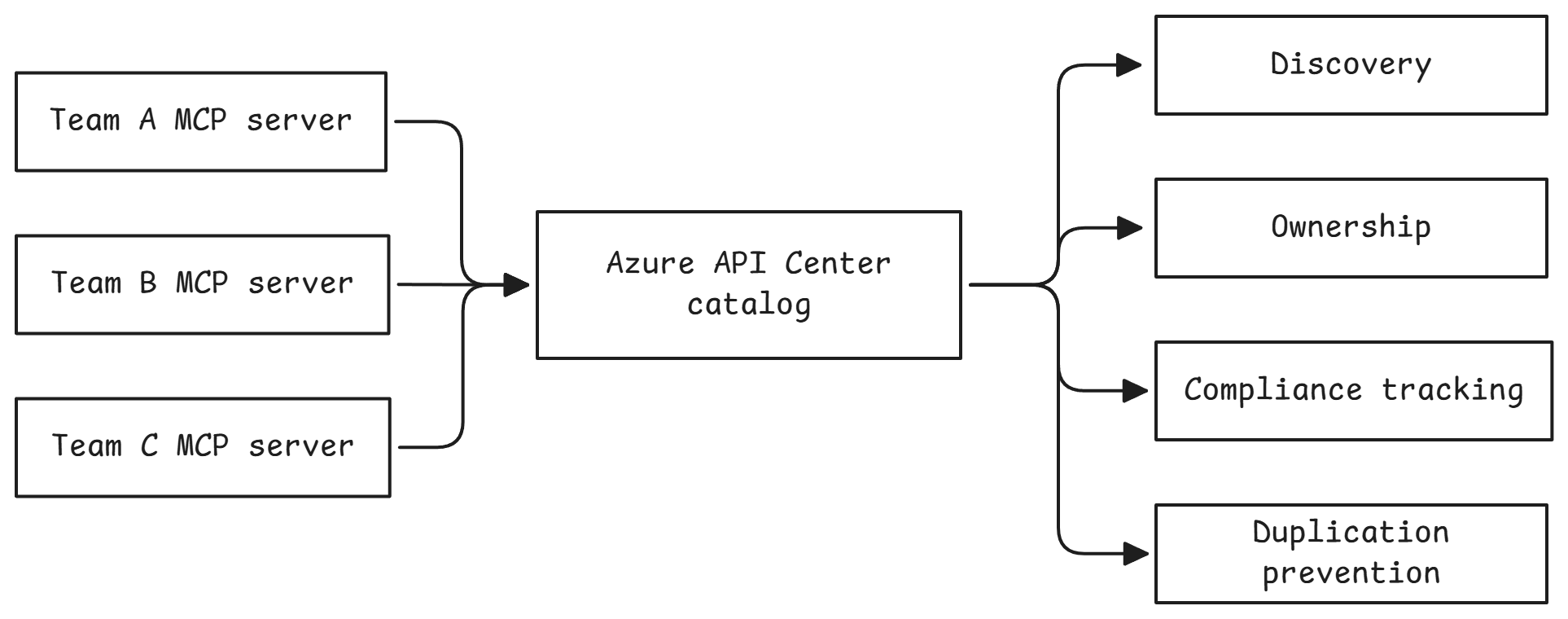
Waypoint 1.4: Register MCP Servers in API Center
Register your MCP servers in Azure API Center:
This registers only the two MCP endpoints—not the backing Trails REST API:
- Sherpa MCP Server - Weather, trails, and gear recommendations
- Trails MCP Server - Trail information and permit management
For each server, the script creates:
- A version marked Preview
- A Streamable HTTP definition
- An active deployment containing the APIM runtime URL
- Use cases, repository, support, and workshop documentation
- Authentication and non-production security metadata
- An association with the shared Camp 2 APIM environment
The script also assigns the signed-in participant the Azure API Center Data Reader role. This camp does not deploy Microsoft Foundry, but the role means the registry could later be discovered as a private tool catalog from a Foundry project if you choose to add one.
Credentials are not stored in API Center
The registry describes the required authentication but does not store credentials:
- Sherpa MCP: Microsoft Entra OAuth
- Trails MCP: Microsoft Entra OAuth and an
Ocp-Apim-Subscription-Keyheader
Consumers configure these credentials when they add the tool. Configuring API Center authorization and portal test-console access is intentionally deferred to a later enhancement.
Verify the API Center inventory
After running the script, open the Azure portal link printed by the script and select Inventory > Assets:
| Name | Type | Version lifecycle | Environment |
|---|---|---|---|
| Sherpa MCP Server | MCP | Preview | Camp 2 APIM Gateway |
| Trails MCP Server | MCP | Preview | Camp 2 APIM Gateway |
MCP is a First-Class API Type
Notice that API Center lists MCP as the API type, not REST or GraphQL. Azure API Center natively understands MCP servers, making it easy to discover and govern all your AI tool integrations in one place.
What You Just Fixed
Before (no governance):
- No authoritative list of approved MCP servers
- No visibility into what MCP servers exist
- Duplicate implementations across teams
- No compliance tracking
- Can't enforce security standards
After (API Center):
- Approved MCP servers registered in a central catalog
- Unregistered servers are easier to identify as shadow deployments
- Easy discovery prevents duplicate work
- Versions, deployments, support, and security requirements are visible
- The registry is ready to surface as a private tool catalog in Microsoft Foundry if you add one later
This provides a governance control for OWASP MCP09 (Shadow MCP Servers) and supports MCP03 (Tool Poisoning) defenses by giving consumers an approved, metadata-rich registry. Enforcement still depends on organizational deployment and access policies.
Going Further: API Center Portal and Tool Authentication
Enable API Center Portal for Self-Service Discovery
API Center Portal provides a self-service website where developers can discover and explore your registered MCP servers without needing Azure Portal access.
Benefits:
- Self-service discovery - Developers find MCP servers without asking around
- Documentation hub - Each MCP server's docs in one place
- Access control - Portal respects Azure RBAC permissions
- Customizable - Brand with your organization's look and feel
Full setup guide: Set up API Center Portal
Make the tools invokable from the portal and Foundry
A future enhancement can configure API Center authorization for:
- Microsoft Entra OAuth authorization code flow
- The Trails APIM subscription-key header
- Key Vault-backed secret references
- API-version access policies
See Authorize access to APIs in API Center and Create a private tool catalog.