
Put multiple MCP servers behind Azure API Management for centralized OAuth, rate limiting, content safety, and governance in this beginner-friendly Microsoft guide.
Welcome to Gateway Ridge!
In Camp 1, you secured a single MCP server with OAuth and Managed Identity. Now imagine you have dozens of MCP servers (weather, trails, gear, permits, guides), each needing consistent security. Securing them individually means duplicating authentication logic, rate limiting, and monitoring across every server.
Azure API Management (APIM) solves this as a centralized MCP gateway: a single, hardened layer where all MCP traffic flows through. Instead of securing each server individually, the gateway validates, rate-limits, and filters every request before it reaches your backends.
This camp follows the same "vulnerable → exploit → fix → validate" pattern from previous camps, but now at scale with multiple MCP servers and comprehensive gateway controls.
Camp Details
Tech Stack: Python, MCP, Azure API Management, Container Apps, Content Safety, API Center, Entra ID Primary Risks: MCP02 (Privilege Escalation via Scope Creep), MCP06 (Intent Flow Subversion), MCP07 (Insufficient Authentication & Authorization), MCP09 (Shadow MCP Servers)
What You'll Learn
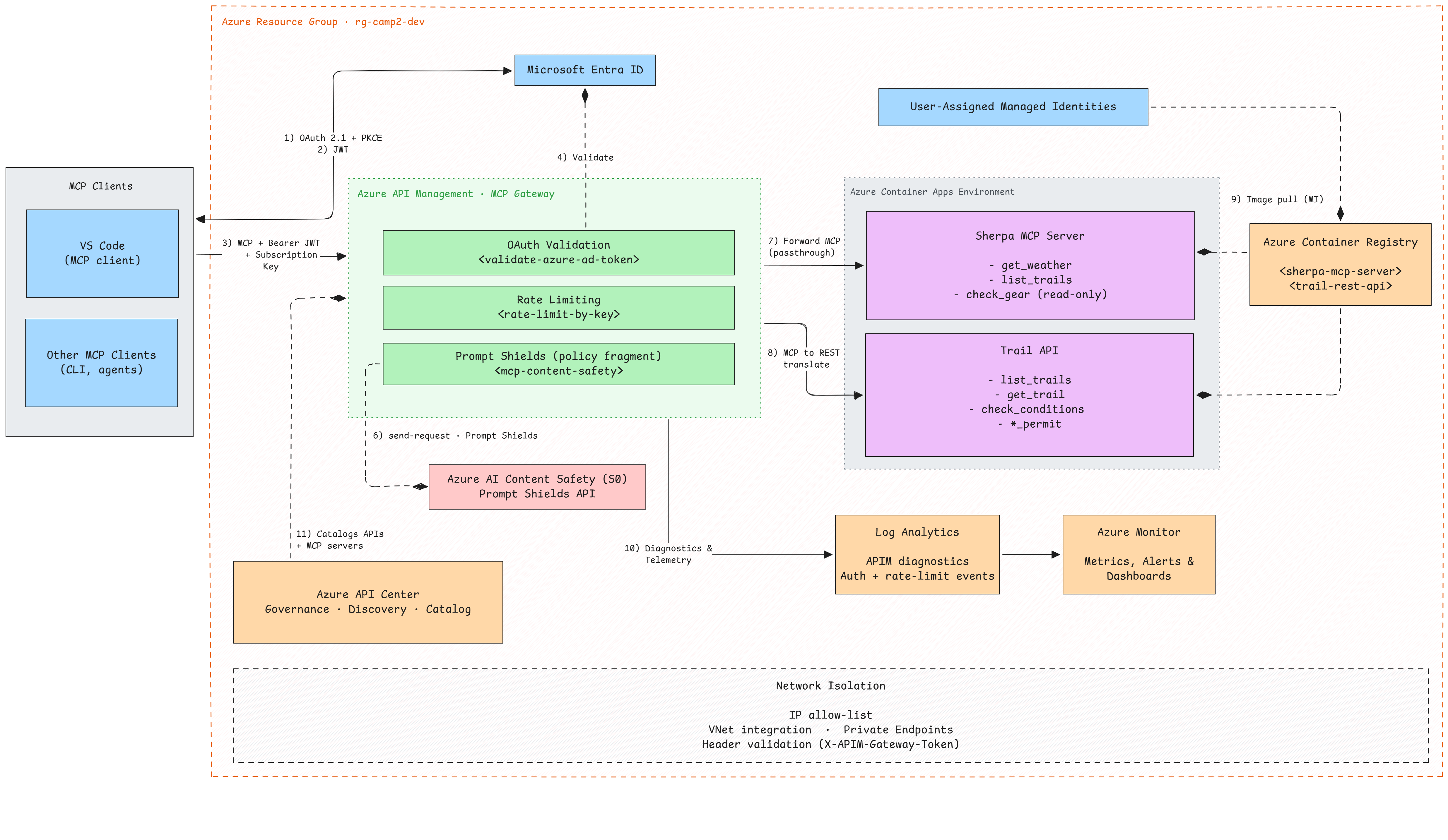
Building on Camp 1's identity foundation, you'll master gateway security at scale for multiple MCP servers:
Learning Objectives
- Expose MCP servers through Azure API Management as a centralized, hardened gateway
- Convert existing REST APIs to MCP at the gateway with subscription-key authentication
- Apply rate-limiting policies to protect backends from abuse and runaway clients
- Detect and block prompt injection attacks with Azure AI Content Safety Prompt Shields
- Govern MCP servers with Azure API Center to prevent shadow deployments and API sprawl
- Apply defense-in-depth gateway policies consistently across multiple MCP backends
Prerequisites
- Azure subscription with Contributor access
- Azure CLI installed and authenticated
- Azure Developer CLI (azd) installed and authenticated
- Docker installed and running
-
Completed Camp 1 (recommended for OAuth context)
-
Full prerequisites guide with installation instructions.
Verify your setup:
Getting Started

# Clone the repo (skip if you already have it)
git clone https://github.com/Azure-Samples/sherpa.git

# Navigate to camp 2
cd sherpa/camps/camp2-gateway

# Provision infrastructure (~10-15 minutes)
azd provision
Windows Users
All scripts in this camp have PowerShell equivalents (.ps1). When you see ./scripts/X.sh, you can run ./scripts/X.ps1 instead.
When prompted, choose an environment name (e.g., camp2-dev), select your Azure subscription, and pick a region (e.g., westus2).
What happens during provisioning?
azd provision executes three phases:
Phase 1: Pre-Provision Hook — Creates Entra ID applications for OAuth:
- MCP Resource App — Represents your MCP server resources with scopes
- VS Code Pre-authorization — Allows VS Code to request tokens without admin consent
- Service Principal — Enables Azure RBAC for the MCP app
Phase 2: Infrastructure Deployment — Provisions all Azure resources (~10 minutes):
| Resource | Purpose |
|---|---|
| API Management (Basic v2) | MCP gateway (APIs added via waypoint scripts) |
| Container Apps Environment | Hosts MCP servers and REST APIs |
| Container Registry | Stores Docker images |
| Content Safety (S0) | AI-powered prompt injection detection |
| API Center | API governance and discovery |
| Log Analytics | Monitoring and diagnostics |
| 2× Managed Identities | For APIM and Container Apps |
| 2× Container Apps | Sherpa MCP Server and Trail API (placeholder images) |
Phase 3: Post-Provision Hook — Reports region adjustments and outputs connection details.
Region Selection
API Center has limited region availability. If your selected region doesn't support API Center, the deployment automatically falls back to eastus for that service. All other resources deploy to your selected region.
When provisioning completes, save your deployment info:
Ready? Let's start by exposing your MCP server through the gateway.