Step 4: Verify Local Settings After Provisioning
-
Check the terminal window where you ran azd provision in Step 1. Wait for it to complete successfully.
-
Once provisioning completes, the postProvision hook defined in azure.yaml automatically runs either ./scripts/generate-settings.ps1 (on Windows) or ./scripts/generate-settings.sh (on Linux/macOS).
These scripts generate the necessary settings in your src/local.settings.json file.
-
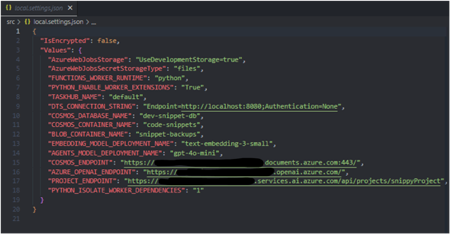
Open your src/local.settings.json file in VS Code and verify it now contains populated values.
-
Your src/local.settings.json file should now look similar to this (with your specific resource details, and additional keys):
-
Only needed if settings are missing
If for any reason the local.settings.json file wasn't properly generated or is missing values, you can manually run the generation script from the repository root:
-
Save the file if you made any changes.