Snippy Lab - Build an AI-Powered Code Snippet Manager
Welcome! This hands-on lab teaches you to build Snippy, an intelligent code snippet manager using Azure Functions, Azure OpenAI, and the Model Context Protocol (MCP).
What You'll Build
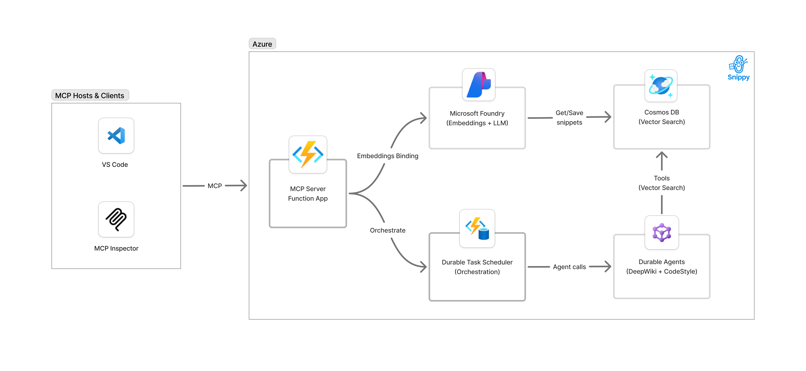
- Serverless API with Azure Functions for saving/retrieving code snippets
- Vector Search using Azure OpenAI embeddings and Cosmos DB
- MCP Tools that GitHub Copilot can discover and use
- AI Agents that generate documentation and style guides from your code
- Multi-Agent Orchestration using Durable Functions
Prerequisites
Before starting, ensure you have:
Required Software
- Visual Studio Code - Download
- Python 3.11+ - Download
- Git - Download
- Azure CLI - Install
- Azure Functions Core Tools v4 - Install
- Azure Developer CLI (azd) - Install
- Docker Desktop - Download
Recommended
Required Accounts
- Azure Subscription - Create free account
- GitHub Account with Copilot - GitHub Copilot
Quick Start
-
Clone this repository
-
Follow the tutorial
- Open TUTORIAL.md for step-by-step instructions
-
Refer to TROUBLESHOOTING.md if you encounter issues
-
Clean up when done
What You'll Learn
- Azure Functions as an AI integration platform
- Model Context Protocol (MCP) for AI assistant integration
- Vector embeddings and semantic search with RAG patterns
- Microsoft Agent Framework for building AI agents
- Durable Functions for multi-agent orchestration
- Azure OpenAI integration with embeddings and chat models
Support
- Issues: Found a bug? Open an issue
- Questions: Check TROUBLESHOOTING.md first
- Discussions: GitHub Discussions
License
This project is licensed under the MIT License - see the LICENSE.md file for details.